The Programs and Majors section within CrossConnect displays the programs and majors that CFNC users can view from the Campus Search, CFNC Explore Programs and Majors, and the College Profile.
Within this section, programs and majors are divided into clusters (or categories). Within each cluster are the programs and majors available to add to your campus. The Programs and Majors section has been prepopulated with data collected from the Peterson’s survey. The clusters and program/major options listed are predetermined by the survey as well. You can add or remove a program or major to your campus at any time.
Note: The College Search only uses the clusters level to return school results. In order for CFNC.org users to see the full list of programs and majors offered, they must view your college profile on CFNC.org. They are also able to use the CFNC Explore Programs and Majors module to work their way backways from their desired program/major to find schools offering that particular program.
Viewing Current Programs and Majors
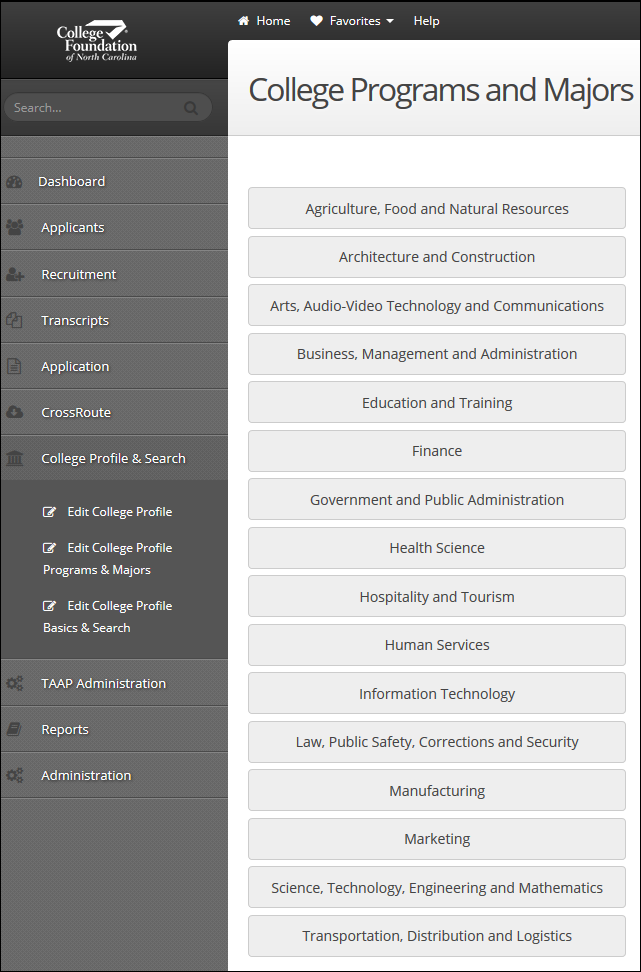
College Profile & Search | Edit College Profile Programs & Majors
Programs and majors are divided out into sixteen different clusters. You cannot edit the sixteen clusters, as they are predetermined by the Peterson’s survey. Select the cluster you wish to view in order to see the available programs/majors contained within it, as well as the Current List of Programs/Majors set for your campus. You cannot edit an existing program or major in your Current List of Programs/Majors. You must delete a Program or Major if it is incorrect and then add it back with the correct information (see Adding a Program/Major and Deleting a Program/Major sections below for more details on this process). Click on one of the sixteen clusters to see the last date the list was updated (at the bottom of the screen).
Adding a Program/Major
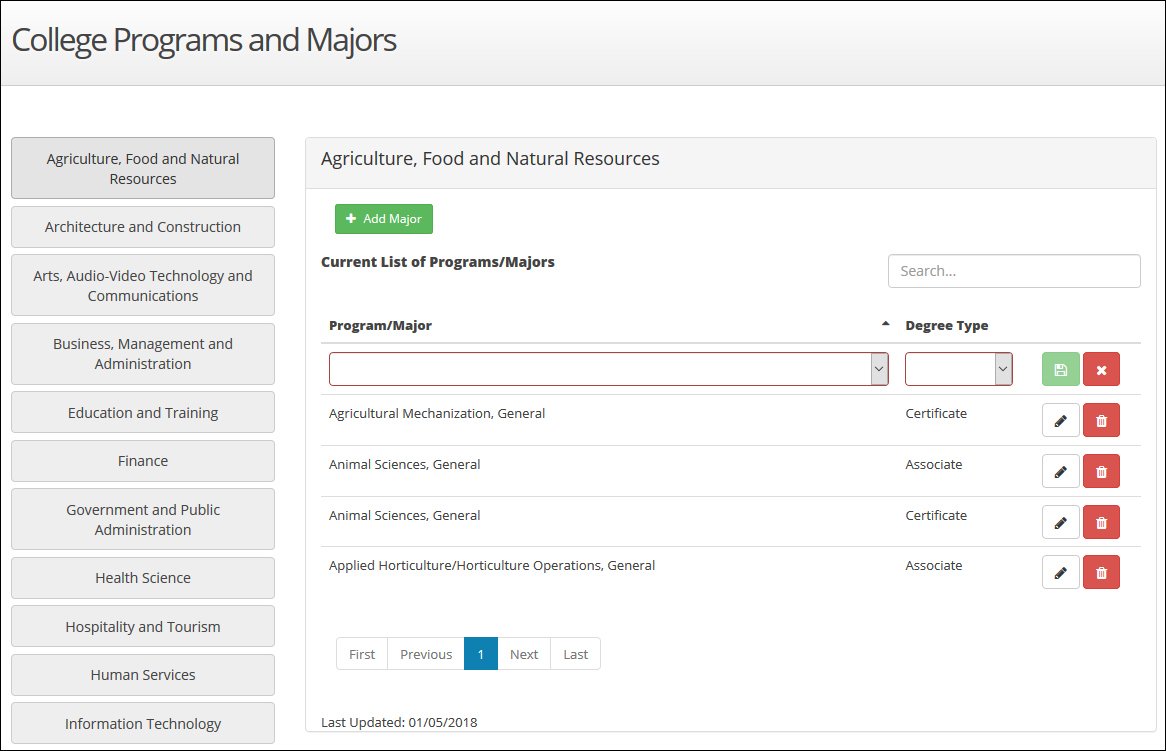
College Profile & Search | Edit College Profile Programs & Majors
There are a large number of predetermined programs and majors options to select from. These options are categorized within the sixteen clusters and are set by the Peterson’s survey. Campuses can add to their Current List of Programs/Majors selection by selecting programs/majors from the Available programs/majors list. To add a new program/major to your Current List of Programs/Majors:
- Select the appropriate cluster for your new program/major from those available in the left menu
- In the Add a new program/major box, click the Available programs/majors dropdown to see the list of programs/majors you can select from
- Scroll through the Available programs/majors dropdown until you find the program/major you want to add and click on its name
- Check the box for the degree type(s) your institution offers for your selection (required). You may select more than one degree type, if more than one is offered by your campus
- Click the Save button (
 ) to add it to your Current List of Programs/Majors
Note: If you have a Program/Major that has multiple degree types offered by your institution, once you have saved, the Program/Major will be added to your current list multiple times, with each degree type getting its own row. Users viewing your college profile from CFNC will only see this program/major once, with any degree(s) you have available listed beside of it.
Deleting a Program/Major
College Profile & Search | Edit College Profile Programs & Majors
Campuses can remove programs/majors from their Current List of Programs/Majors by:
- Select the cluster in which the program/major you want to remove is located
- In the Current List of Programs/Majors section, locate the specific program/major you want to delete
- Click the Delete button (
 ) to the right of your selection
 - Click Yes to confirm that you want to delete this program/major
Common College Profile Programs & Majors Examples
Adding a new program/major
You want to add a new major, “Broadcast Journalism”, to your Current List of Programs/Majors. You campus offers this major as both an Associate and Bachelor’s degree.
- Select the Arts, Audio-Video Technology and Communications cluster
- In the Add a new program/major section, click the dropdown list beside of Available programs/majors
- Find Broadcast Journalism and select it
- Next to Degree types click the checkboxes next to Associate and Bachelor’s
- Click the save button (
 )
)
Removing an existing program/major
You want to remove the major “Medical/Clinical Assistant” from your Current List of Programs/Majors.
- Select the Health Science cluster
- Under the Current List of Programs/Majors section, locate the Medical/Clinical Assistant major
- Click the Delete button (
 )
)
Editing an existing program/major
You currently have the major “Advertising” listed in your Current List of Programs/Majors with the degree type of “Associate” and you want to change this degree type to “Bachelor’s”.
- Select the Marketing cluster
- Under the Current List of Programs/Majors section, locate the Advertising major
- Click the Delete button (
 )
) - In the Add a new program/major section, click the dropdown list beside of Available programs/majors
- Find Advertising and select it
- Next to Degree types click the checkbox next to Bachelor’s
- Click the save button (
 )
)